TL;DR
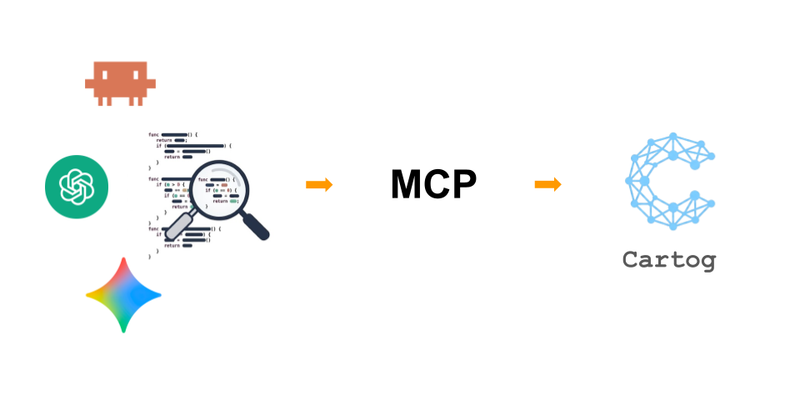
A code graph is only useful to an agent if it knows how to query it. Cartog exposes 16 tools via Model Context Protocol (stdio JSON-RPC) (e.g.cartog_search,cartog_outline,cartog_refs,cartog_callees, etc.).
Each tool’s description lets the agent pick the right one based on context (“use when… not for…”).
SQLite runs in WAL mode to allow concurrent reads and writes for better performance.
To try it out and learn more: MCP documentation · Cartog source code.
The four previous articles build a directed graph: symbols extracted by tree-sitter, semantic embeddings for meaning-based search, edges resolved more precisely with LSP, relevant re-indexing thanks to the Merkle tree.
From the CLI, it works: cartog impact validate --depth 3 responds in a few milliseconds.
But in practice, the user doesn’t type cartog impact themselves.
They chat with an agent (Claude Code, Cursor, etc.) that has to decide whether to query the graph, how, and in what order.
The user asks “What’s the impact of renaming
authenticate?”. How can the agent make the right decision and call Cartog?
Two questions to solve on the server side:
- Transport: how to expose these functions from our Rust CLI to an LLM process running elsewhere — without custom HTTP and without per-editor integration.
- LLM readability: how to describe each tool so the agent picks the right one without hardcoding any routing logic.
The Model Context Protocol is an open specification published by Anthropic in late 2024, then adopted by other agent editors.
The idea: a standard for plugging external tools into an agent (just as LSP standardizes plugging language servers into an IDE).
In one sentence (this isn’t meant to be a full tutorial)
An MCP server communicates via JSON-RPC over stdio, the client launches the binary and exchanges in two phases: a negotiation (the client asks for the list of tools and their schemas) and calls (the agent invokes a tool and receives a structured result).
sequenceDiagram
    participant A as Client / Agent
    participant S as MCP Server

    Note over A,S: 1. Negotiation (once, at startup)
    A->>S: initialize
    S-->>A: capabilities
    A->>S: tools/list
    S-->>A: [ {name, description, inputSchema}, ... ]

    Note over A,S: 2. Calls (each agent turn)
    A->>S: tools/call {name, arguments}
    S-->>A: result (structured JSON)
For a French-language introduction to the protocol itself (beyond Cartog), see the talks by Bertrand Nau and Horacio Gonzalez.
Cartog implements the MCP protocol and any MCP client benefits from it, without dedicated per-editor integration.
The Cartog docs currently list twelve compatible clients (Claude Code, Cursor, VS Code, Claude Desktop, Codex CLI, Gemini CLI, OpenCode, Windsurf, Zed, Antigravity, Kiro, Hermes Agent). The list grows with the protocol and new editors — nothing needs to change on Cartog’s side.
Applied to Cartog, this generic schema gives a concrete flow:
- the agent translates a user question into a
tools/call - the server queries SQLite and returns JSON.
sequenceDiagram
    participant U as User
    participant A as Agent (e.g. Claude Code)
    participant M as cartog serve (MCP)
    participant DB as SQLite (.cartog/)

    U->>A: "who calls authenticate?"
    A->>M: tools/call cartog_refs {name: "authenticate"}
    M->>DB: SELECT FROM edges WHERE target = ...
    DB-->>M: 12 rows
    M-->>A: JSON {edges: [...]}
    A->>U: answer + file:line citations
On the implementation side, Cartog relies on the rmcp crate (the official Rust MCP implementation).
The binary exposes server mode via cartog serve, launched by the editor at session startup.
stdio only? MCP also defines an HTTP transport.
Why not use it?
Because we don’t need it right now. MCP defines two transports:
- stdio (the server runs locally, launched by the client)
- HTTP (the server runs elsewhere, reachable over the network).
Cartog only does stdio, and that’s a deliberate choice consistent with the rest of the series:
- Local by default. The server is a child process of the editor, on the same machine. The code, the SQLite graph, the queries: nothing travels over the network. Same guarantee as for embeddings computed locally.
- Zero network configuration. No port to open, no TLS to manage, no auth to wire up. The client launches the binary, we talk over stdin/stdout, end of story.
- Right scope. The index lives in the repo, on the developer’s machine. Serving this graph over HTTP would imply a remote use case (shared graph in CI, team-wide) that belongs to a different building block — the optional S3 sync, dormant unless explicitly configured.
HTTP transport isn’t ruled out. When a remote use case justifies it, it can be added. MCP allows it without changing any of the 16 tools or their descriptions.
But as long as Cartog is a local tool, adding a network surface also adds complexity.
The server exposes a structured subset of the CLI. Thirteen are read-only; three write (cartog_index, cartog_rag_index rebuild the index, cartog_update prepares a deferred binary update):
| Tool | Role | When the agent calls it |
|---|---|---|
cartog_search | Search by exact/partial name | Before refs/callees/impact |
cartog_rag_search | Semantic + BM25 search | Default entry point for any discovery |
cartog_context | One-shot bundle: relevant symbols + bodies for a task | First call to frame a task in a single round-trip |
cartog_outline | File structure | Instead of Read when you just want the list of symbols |
cartog_refs | Who calls/imports/inherits X | ”who calls X?” |
cartog_callees | What X calls | ”what does X call?” |
cartog_impact | Transitive blast radius | Before a rename/delete/move |
cartog_trace | Shortest call path between two symbols, with inline bodies | ”how does X end up calling Y?” |
cartog_hierarchy | Inheritance tree | For class / trait |
cartog_deps | File imports | Direct dependencies |
cartog_changes | Symbols touched by the last N commits + working tree | Regression triage |
cartog_map | File tree + top symbols | First call in an unknown repo |
cartog_stats | Index health and information | Verify the index is up to date |
cartog_index | (Re)build the index (writes) | Once per session, after a large refactor |
cartog_rag_index | Build the vector index (writes) | Once per project, optional |
cartog_update | Prepare a deferred binary update (writes machine state, not the index) | On explicit update request (useful if the plugin hasn’t updated the binary) |
This list is less complete than the CLI arguments.
The commands cartog init, cartog ide, cartog doctor, cartog config remain CLI-only because they write user files or diagnose the environment (these are not operations an agent should trigger on its own).
The Rust code that declares a tool fits in two lines — the description does all the work.
The description field of each tool is read by the LLM on the client side to decide when to call the tool. It’s the user interface of an agent.
Concrete example, the description of cartog_impact:
Assess blast radius before refactoring. Shows everything that transitively depends on a symbol up to N hops.
Use when asked ‘what breaks if I change X?’, ‘is it safe to rename/delete X?’, or before any rename/extract/move/delete refactoring.
Not for: direct callers only (usecartog_refs), or what the symbol calls (usecartog_callees).
Returns: array of{edge, depth}where depth=1 is direct, depth=2 is one hop away, etc.
Four systematic elements:
- Description: what the tool does.
- Use when: likely phrases from the user (“what breaks if…”, “is it safe to…”).
- Not for: competing tools and when to prefer the other one. This is negative routing — without it, the agent picks at random between
refs,callees, andimpact. - Returns: the output schema, so the agent knows how to parse without guessing.
This pattern is repeated across all tools. The description of cartog_rag_search explicitly mentions “DEFAULT entry point for finding code” — that’s what pushes the agent to use it before Grep.
The description of cartog_search frames the inverse: “use ONLY to get a precise symbol name before calling cartog_refs, cartog_callees, or cartog_impact”.
flowchart TD
    Q["User question"] --> D{"Type of question?"}
    D -->|"concept / natural language"| RAG["cartog_rag_search"]
    D -->|"known symbol name"| S["cartog_search"]
    D -->|"who uses X?"| R["cartog_refs"]
    D -->|"what does X do?"| C["cartog_callees"]
    D -->|"safe to change X?"| I["cartog_impact"]
    S -->|"exact name"| R
    S --> C
    S --> I

    style RAG fill:#e8f5e9,stroke:#4caf50
    style I fill:#fff3e0,stroke:#ff9800
No routing logic is hardcoded in Cartog.
Everything lives in the description text read by the LLM at each turn.
A cartog_impact authenticate --depth 5 on a large project can surface hundreds of edges and quickly exceed what a context window can usefully absorb.
If you send back the full raw response, the agent burns its context window in a single reply.
Cartog therefore enforces a per-response byte cap on the server side (64 KB by default, overridable via CARTOG_MCP_MAX_BYTES). When the output exceeds the threshold, the server truncates at a UTF-8 boundary and appends a truncation notice:
Response truncated: 14 832 bytes omitted to stay under the 65 536-byte cap.
Re-run with a more specific symbol name, or filter by --kind.
The agent receives a usable result and knows what action to take to refine. The hint is specific to each tool: cartog_impact suggests reducing depth, cartog_refs suggests filtering by --kind.
Two design choices behind this:
- Truncate server-side, not agent-side: the agent can’t measure its own bytes; the server can.
- Action hint, not just a counter: the notice says what to do, not just how many bytes are missing.
Unlike --tokens (a budget declared by the caller, for human-readable text output), the MCP cap is set server-side, always active, and applies to the JSON returned to the agent.
An operational subtlety: while a cartog serve is alive in the editor, the user might well run cartog index . by hand, or leave cartog watch running which re-indexes continuously.
There can therefore be multiple writers on the same SQLite file.
Three SQLite pragmas are enabled at startup:
- WAL (write-ahead log): reads and writes can coexist without blocking.
busy_timeout: a waiting writer waits N ms instead of immediately returningSQLITE_BUSY.synchronous=NORMAL: durability/performance trade-off suited to a reconstructible index.
Result: the agent can keep querying while indexing runs, without crashes or corruption.
New symbols become visible on the next tool call — no server restart needed.
A question “is it safe to rename authenticate?” becomes, on the agent side:
cartog_search { query: "authenticate" }→ 1 exact symbol,id=42.cartog_impact { name: "authenticate", depth: 3 }→ 18 transitive dependents (truncated to 50 if exceeded, with a hint).- Targeted read of the 3-4 most critical call-sites via
Readwithoffset/limit.
Three tool calls, no grep -r, no cat on an entire file. The context window serves reasoning, not digesting 4000 lines.
The agent’s final response, after these three calls:
Yes, renaming `authenticate` is feasible, but 3 things to watch:

- middleware/auth.ts:42 — direct call, rename at the same time.
- tests/auth.test.ts:18 — mock of the exact name as a string literal ('authenticate'),
  update manually.
- UserController.login() → SessionManager.start() → authenticate:
  indirect chain at depth=2, covered if renamed via LSP.

The other 15 dependents are imports of the `auth` module —
they don't reference the function name directly.Rather than editing config files by hand, cartog ide generates them automatically for supported MCP clients.
Run in a terminal, it displays an interactive selector of detected clients.
cartog ideInteractive output:
? step 1 — which clients to configure? (space to toggle, enter to confirm) ›
✔ Claude Code      project + user available      will create
✔ Cursor           project                       will create
✔ VS Code          project + user available      will create
✔ Claude Desktop   user                          present, will merge
✔ Windsurf         user                          present, will merge
✔ OpenCode         user                          present, will merge
⬚ Zed              user                          not installed
⬚ Codex CLI        user                          not installed
✔ Gemini CLI       user                          present, will merge
⬚ Antigravity      user                          not installed
✔ Kiro             project + user available      will create
⬚ Hermes Agent     user                          not installed
To preview without writing:
cartog ide --dry-run+ claude-code (project, .mcp.json): would create
{
  "mcpServers": {
    "cartog": {
      "command": "cartog",
      "args": ["serve", "--watch"]
    }
  }
}For Claude Code only (project scope, .mcp.json):
cartog ide --client claude-codeThe result written to .mcp.json:
{
"mcpServers": {
"cartog": {
"command": "cartog",
"args": ["serve", "--watch"]
}
}
}With --watch, the server watches files and re-indexes on the fly: new symbols are visible on the next tool call, no server restart needed. Without --watch, the index is frozen until the next manual cartog index.
Each client has its own file format and JSON key — cartog ide handles the differences, idempotent merges, and preserves any other MCP servers already present.
For the full client list and manual snippets: MCP documentation.
On the server side, the mechanics are in place: stdio transport, 16 tools, routable descriptions, byte cap, SQLite concurrency.
The agent can query the graph without grep, without cat, without burning its context window on an entire file.
MCP inverts the flow: the agent queries the graph at the right moment, without the user needing to know the commands. cartog ide reduces bootstrapping to one command, and idempotent configs allow versioning .mcp.json in the repo for the whole team.